Introducing Project OS: A Governance Operating System for AI-Augmented Development
Update, September 2026: The board is live; your agent connects with one line from the board; the gate writes done, with a receipt; export is a fallback.
Project OS export is paused while Facts → Plan → Board replaces it; the board and the Connect line are the live path.
From Artifact Trap to Operating System
If you read The Artifact Trap, you know the problem: AI tools generate impressive documents that nobody follows. The PRD gets written and forgotten. The architecture drifts. The coding standards exist in theory.
We didn't want to build another generator. We wanted to build the layer that makes generated artifacts enforceable — a governance operating system that travels with your code.
This is Project OS.
What Is Project OS?
Project OS is a portable, self-contained governance instance that lives in your repository. It's not a plugin or a SaaS dashboard. It's a structured set of artifacts that any AI coding tool can read and follow:
- PRD: What you're building and why
- Architecture Blueprint: How the system is structured, what patterns to follow
- Decomposition Plan: Work broken into stories and microtasks with dependencies
- Governance Doctrine: File limits, complexity thresholds, role definitions, quality gates
Together, these artifacts create an operating system for your project — one that persists across sessions, tools, and team members.
The Four-Step Pipeline
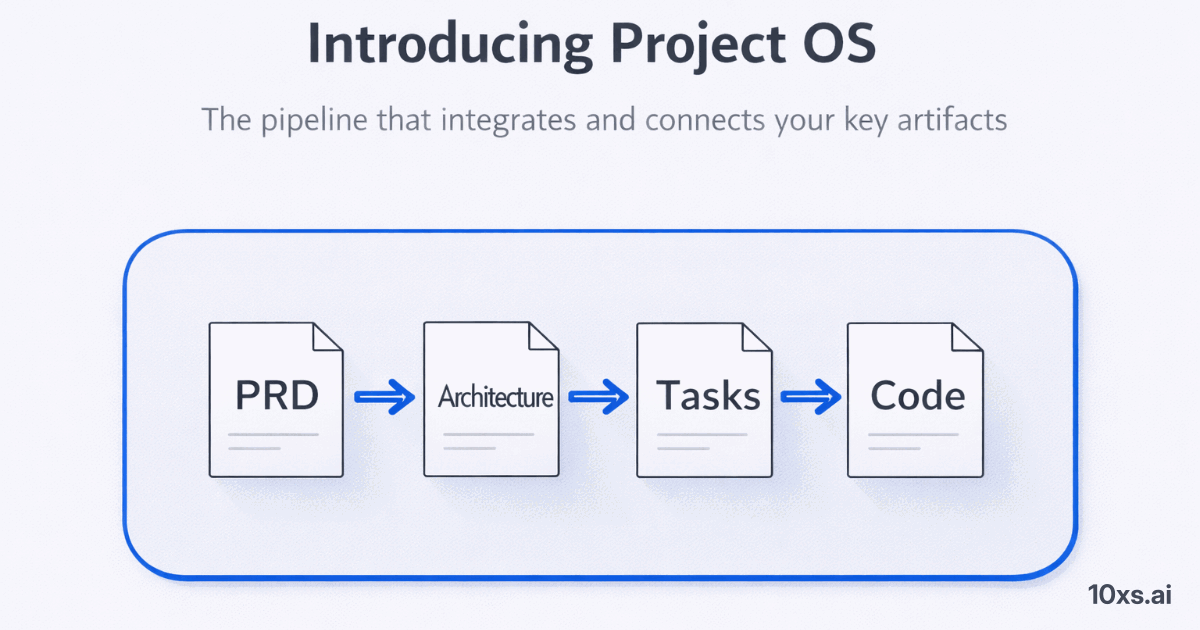
Project OS is generated through a four-step pipeline, where each step builds on the previous:
1. Generate PRD
Start with an idea — even a rough one. The PRD Generator transforms it into a structured product requirements document with user stories, success criteria, and technical constraints. Refine iteratively until the scope is right.
2. Blueprint
The Architecture Blueprint takes your PRD and produces a technical architecture: technology stack, component structure, API design, and integration patterns. It's the structural foundation that all downstream work inherits.
3. Decompose
Decomposition breaks the blueprint into executable work: epics, stories, and microtasks. Each microtask has clear boundaries — target files, estimated effort, dependencies, and acceptance criteria. Strategy becomes action.
4. Export
Export packages everything into a portable governance OS — a zip file you drop into any repository. Your AI coding assistant reads the included adapter file and immediately understands your project's rules, structure, and current state.
What's Inside the Export?
When you export a Project OS instance, you get a structured zip:
10xs/
  CLAUDE.md                  # AI assistant adapter
  PRD.md                     # Product requirements
  README.md                  # Human-readable overview
  MERGE_GUIDE.md             # Integration instructions
  architecture/generated/    # Blueprint, Decomposition, Status
  governance/                # Profile, kernel version, schemas
  doctrine/                  # Role definitions, workflows, quality standards
The doctrine documents encode the rules AI assistants follow. The architecture files provide context. The adapter ties it together into a single entry point that your AI tool reads on session start.
Why This Matters If You Lead a Team
If you're running an engineering team that uses AI coding tools, you've experienced the inconsistency firsthand. One session produces clean, modular code. The next produces a monolith. One developer's AI follows your conventions. Another's reinvents them.
Project OS eliminates this variance. Every AI session starts with the same context, the same rules, the same understanding of your architecture. It doesn't matter which developer opens the session, which AI tool they use, or how much time has passed.
The result: AI output becomes predictable enough to trust. And when you can trust the output, you can scale the process.
Why Governance Matters
Without governance, AI generates plausible but inconsistent code. It has no memory of what patterns your team chose, or why.
Governance provides the constraints that make AI output predictable:
- File length limits prevent monolithic files that are hard to review
- Complexity thresholds keep functions focused and testable
- Role separation ensures architects design and developers implement
- Session continuity rules mandate handoff documents so context survives
- Quality gates require actual test evidence, not just claims
These aren't bureaucratic overhead. They're the engineering equivalent of type systems — constraints that prevent entire categories of errors.
The Engine Underneath
The engine underneath Project OS is the 10xs-kernel, an LLM-agnostic governance engine. The kernel defines the spec (YAML schemas, validation rules, doctrine templates) while the runtime provides TypeScript adapters for any tool to consume.
The exported CLAUDE.md is an adapter for Claude, but the governance artifacts are tool-neutral. A CURSOR.md or COPILOT.md adapter can be generated from the same kernel — the rules stay the same, only the format changes.
Try It Now
Project OS is live at 10xs.ai/tools/prd. Start with a project idea, walk through the four-step pipeline, and export your governance OS in minutes.
Whether you're a solo developer working with AI assistants or a team lead trying to maintain consistency across AI-augmented workflows, Project OS gives your tools the context they need to do their best work.
Generation got us started. Governance gets us to production.
The work doesn't leave. It lives here, and it keeps moving.
Start free